

- Features
- Tables and Dining Rooms
Restaurant Table and Dining Room Management
Discover how to configure dining rooms and tables intuitively and organize service with Risto Pilot (from any device) 🗺️🍽️
The dining room is your “engine”: if tables and spaces are clear, service runs smoothly. If they are not, even the best staff ends up improvising with tables to move, capacities to remember by heart, and layouts to redo a thousand times.
With Risto Pilot’s restaurant Table and Dining Room Management, you build a precise, updated, and easy-to-use map: each table has its dining room, its capacity, and its position. The result is easy to see: more order, more speed, fewer mistakes. ✅ When the table map is clear, ordering and billing also flow better with Orders and Checkout.
- ✅ Configure dining rooms and capacities in just a few minutes
- ✅ Create tables with min/max seats and shape (square, rectangular, circular)
- ✅ Place them on a graphic map with drag & drop, alignment, resize, and rotation
- ✅ The map can scroll (overflow) to manage even “table-packed” dining rooms without going crazy
Restaurant Table and Dining Room Management: why a well-made table map immediately improves service ⚡
Effective table management is not “aesthetic”: it is operational. When the dining room is well mapped, staff can instantly see where to place a party of 2, 4, a group, or a table that can expand in seating. And above all, they work with a logic: less “where do we put them?”, more “how do we make them comfortable?”.
In practice, a good Restaurant Dining Room and Table Management App helps you: reduce assignment errors, avoid awkward layouts, speed up dining room organization, and keep consistency between real capacity and service (which you can also read in Statistics: occupancy, turnover, peak hours). It is one of those things that, once active, makes you wonder how you managed before. 😄
Intuitive Dining Room Management
See table availability in real time for each time slot or the status of table reservations
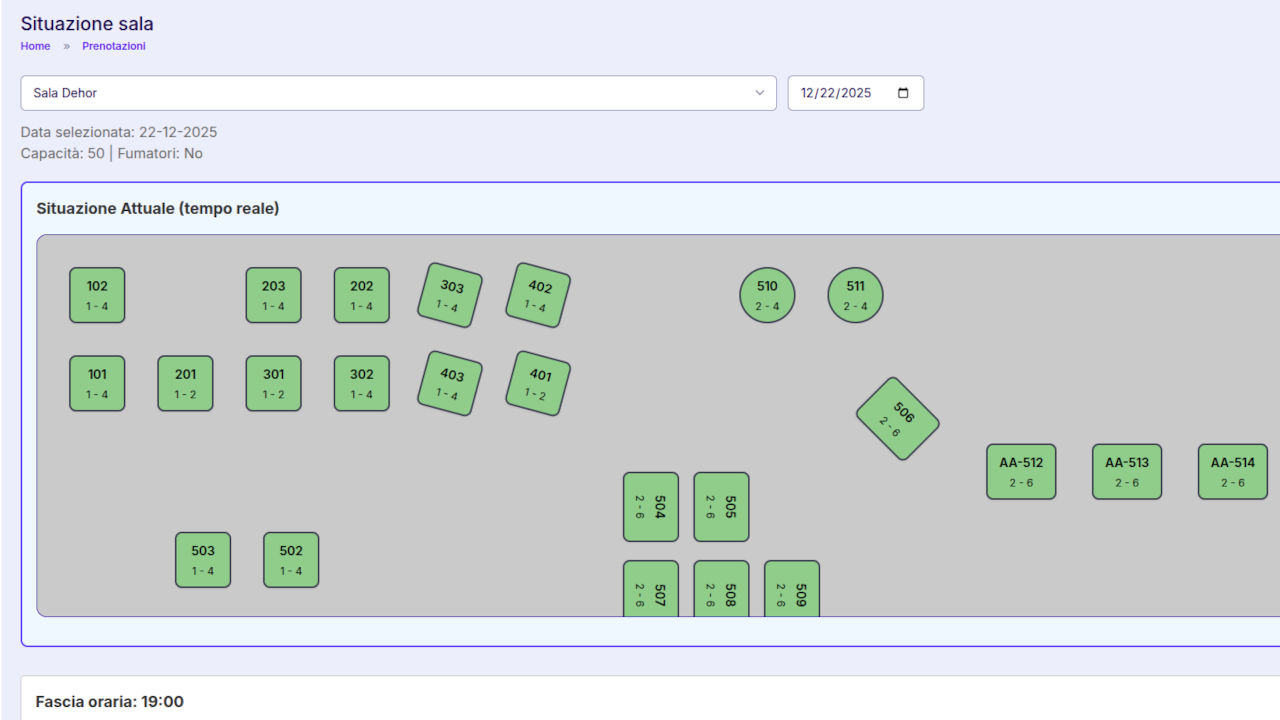
Restaurant Dining Room and Table Management App: simple and organized Room configuration 🏷️
Restaurant Table and Dining Room Management always starts with the rooms. Risto Pilot lets you define dining rooms with the essential fields: name and capacity. No unnecessary frills: just the information you really need to work well.
Restaurant Table and Dining Room Management: what you gain by configuring rooms properly ✅
- A clear structure: indoor dining room, outdoor area, veranda, private room... each with its own logic.
- A reference capacity to organize service without “guessing”.
- A stable base on which to place tables and make the map readable at first glance.
Restaurant Table and Dining Room Management: Table configuration with capacities, shapes, and position 🪑
Every table is not just “a number”: it is an operational element. In Risto Pilot, within the restaurant graphic dining room and table management, you can define the key fields for each table: room, name, min pax, max pax, position (coordinates), and shape (square, rectangular, circular).
Restaurant Dining Room and Table Management App: why min/max seating saves your day 👌
Setting min pax and max pax makes the dining room more “predictable”: it prevents you from randomly assigning a small table to a group or wasting a large table on a couple when you cannot afford to. It is a simple choice that brings order to decision-making.
Restaurant Table and Dining Room Management: table shapes (square, rectangular, circular) for a more realistic map 🧩
Shape is not a detail: it helps you visualize spaces better and create a map that truly resembles your dining room. This makes it quicker to read and reduces misunderstandings during service (especially during busy moments).
Restaurant graphic dining room and table management: editor with drag & drop, alignment, resize, and rotation 🧲
The heart of restaurant Table and Dining Room Management is the graphic editor: it is used to position tables precisely, with a “map-like” experience rather than a “list-like” one. The goal is simple: help waitstaff and service managers work efficiently, without having to guess.
Restaurant graphic dining room and table management: precise positioning with drag & drop 🎯
Tables are positioned by dragging them into the dining room. It is the fastest way to reproduce the real dining room and make changes when you change the layout (seasonally, for events, or for new space requirements).
Restaurant graphic dining room and table management: vertical and horizontal alignment “at a glance” 📐
Before “dropping” one table next to another, it should be clear whether they are aligned. For this reason, the editor includes behavior that makes vertical and horizontal alignment obvious, so you can build tidy rows and keep the floor plan clean and readable.
Restaurant graphic dining room and table management: resizable and rotatable tables to fit spaces 🔄
Not all dining rooms are “perfect”: columns, corners, passageways, walls, narrow outdoor areas. That is why tables can be resized and rotated. This makes the map truly faithful to reality, rather than an approximate representation.
Restaurant graphic dining room and table management: large dining rooms? the map scrolls (overflow) without limits 🧭
Some venues have lots of seats, multiple dining rooms, or dense layouts. The editor is designed to handle vertical and horizontal overflow: the room can scroll to contain many tables, preventing the map from “breaking” or becoming unmanageable when the layout exceeds the visible space.
Restaurant Table and Dining Room Management: practical tips to optimize space and service flow 🧠
A good table map is not just for “putting tables in order”: it helps people move well, reduces friction, and keeps service stable even when the place is full... and the transfer of orders to the kitchen becomes smoother with KDS. Here are some practical choices that almost always work:
- Draw the walkways first: leave comfortable paths for staff and guests, then place the tables.
- Group by logic: create “zones” (even just visually) to improve staff organization (even better if aligned with Shift Schedule).
- Respect real capacity: room capacity and table min/max should reflect how you actually work, not “how it would be nice”.
- Prepare the room for groups: plan tables with flexible capacities and a coherent layout.
- Update when you change the layout: an accurate map is gold, an outdated map only creates confusion.
Restaurant Dining Room and Table Management
Quickly change the table layout in the dining room and make the changes immediately available to all staff.
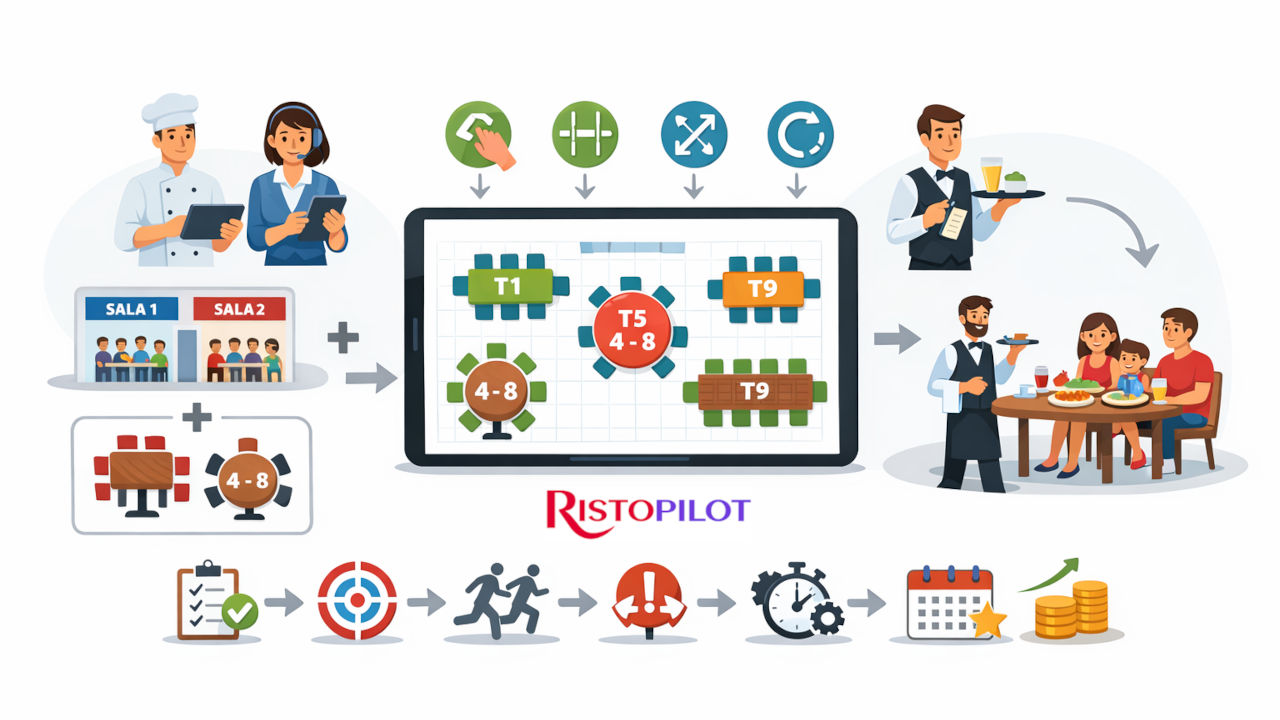
Restaurant Dining Room and Table Management App: quick setup in 6 steps ⚙️
- Create the rooms with name and capacity.
- Add the tables by choosing the room and name.
- Set min pax and max pax for each table.
- Choose the shape (square, rectangular, circular).
- Position them on the map with drag & drop, alignment, resize, and rotation.
- Save: the map is ready to be used as an operational reference.
It is a job you do properly once... and then it repays you every day in order, speed, and control. ✅
Related Modules 🔗
Restaurant Table and Dining Room Management is the “bridge” between reservations, service, and checkout: when the modules communicate with each other, you assign covers better, serve faster, and close bills without issues.
Restaurant Table and Dining Room Management: try it now (limited tests) 🚀
Do you want to see live how the restaurant graphic dining room and table management works and how much it can simplify service organization? Try the suite now: available trial versions are limited.
More order in the dining room. More control over service. More time to run your restaurant the right way. 🍽️