

- Features
- kitchen display system
KDS for restaurants
How to send orders in real time to your restaurant departments (kitchen, pizzeria, bar) with Risto Pilot 🍽️⚡
If orders today get “lost” between paper tickets, shouted calls at the pass, and constant back-and-forth running, there is a simpler way: a KDS display for restaurants (Kitchen Display System) that receives courses in real time and organizes them by preparation status.
With KDS for restaurant departments by Risto Pilot, kitchen and floor staff communicate better: departments see what to do, when to do it, and what is already ready. And you get more control, less confusion, and smoother service. ✅
KDS for restaurants: what a Kitchen Display System is (explained simply) 👨🍳🖥️
A KDS is a screen in each department that receives orders from the management system (waiters’ orders and, if enabled, also Orders from Customers) and shows them clearly, up to date, and in an “operational” way.
In practice, it replaces (or supports) paper tickets: no handwriting to decipher, no lost slips, and fewer forgotten items. The department sees the requests, takes them in charge, and moves them forward until “ready”.
- Order and priority: courses do not overlap “by voice”.
- Fewer errors: ingredients, notes, and changes stay traceable.
- More controllable times: you can see where queues build up and what slows service down (and measure it in Statistics and Reports).
KDS for restaurant departments: how the order → production flow works (in Risto Pilot) 🔁
The flow is linear, and above all repeatable (which is what makes service “solid” even on busy nights): the waiter enters the order, decides when to send the course to production, and the department receives it immediately in the KDS. During peak service (or with Takeaway active), the KDS helps you keep production organized.
- You enter the dishes into the order (also for different courses: 1st, 2nd, etc.).
- You send the course to the department when you want preparation to begin (not “randomly”, but methodically).
- The department sees the request on the KDS and moves it forward with clear preparation statuses.
- Floor staff and cashier stay aligned because the preparation status is shared in real time... the floor sees the status and coordinates better also through Table and Dining Room Management.
If you also enable customer orders at the table, the concept does not change: the order enters the management system and reaches the same departments. Result: fewer manual steps and fewer “double transcriptions”. 📲
Kitchen Display System for your restaurant
Orders and customer orders go directly to the production department (waiters’ orders and customer orders come from the Orders and Cash Register flow and immediately end up on the KDS), streamlining operations and reducing time wasted by staff
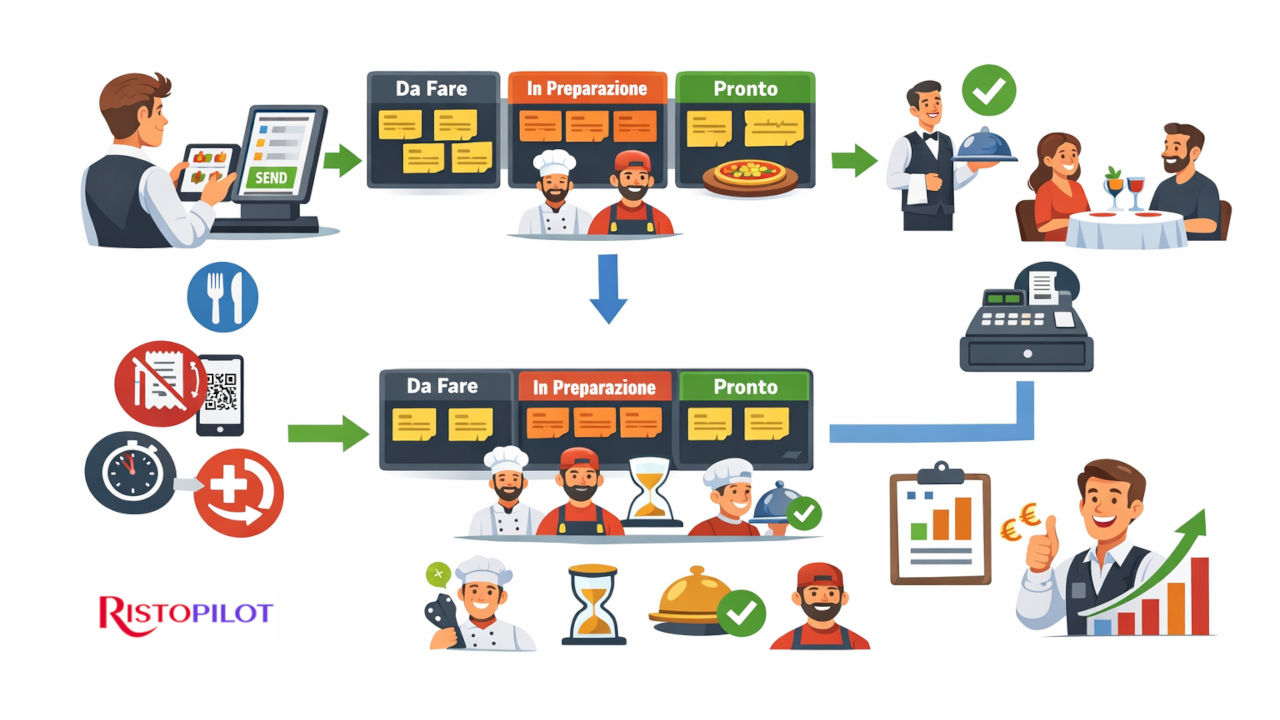
KDS display for restaurants: clear preparation statuses (from “To Do” to “Served”) ✅⏱️
The KDS makes it immediately visible what is happening in the department. No guesswork: every dish is in a precise status and can be advanced with a simple action.
To Do
This is where what has just entered production appears. It is the department’s clean “queue”: whoever takes charge knows what to start with.
In Preparation
When a dish is being worked on, the status makes it immediately clear. The floor understands that it is not stalled: it is “in progress”.
Ready
When it is ready, there is no need for shouting: the floor sees that it can pick it up. And the pass becomes more organized.
Served
You close the cycle: what has been delivered does not remain “hanging”. Less chaos, more operational clarity.
This approach is not only convenient: it is a concrete way to reduce errors, improve communication between floor and production, and make service flow more smoothly. 🎯
KDS for restaurant departments: one KDS for kitchen, pizzeria, and bar (each sees what they need to do) 🍕🍸
In venues with multiple departments, the risk is always the same: “everything reaches everyone” and no one knows what is really theirs. With Risto Pilot, you can have separate KDS systems for restaurant departments: each department receives its own courses, with context (table/dining room) and timing.
- Kitchen: starters, mains, side dishes, etc.
- Pizzeria: a dedicated flow, without “mixing” kitchen priorities.
- Bar: drinks and quick preparations, with immediate visibility.
KDS for restaurants: practical benefits you can feel within the first few weeks 🚀
The point is not “having a screen”. The point is making floor staff and production work better with one single flow. And the benefits are very concrete:
- Fewer errors and repetitions: no rewritten orders, no “I thought it was...”
- Faster service: fewer manual steps and fewer unnecessary waits.
- Real coordination: the floor sees the status and manages timing and guest communication better.
- More control: times and statuses help you understand where bottlenecks are created.
- More relaxed departments: less chaos = better quality and more consistency in service.
KDS display for restaurants: KDS or printers? The smart answer is “it depends” (and often “both”) 🖨️🖥️
In some departments, a printer may still be useful (for example because of pace, habits, or layout). In others, the KDS is a game changer because it makes everything visible and reduces operational noise.
The strong point is flexibility: you can set up a more “digital” flow where speed and traceability matter, and keep print support where it is truly useful. This way you do not force a drastic change: you manage it. ✅
Related Modules 🔗
The KDS works best when it is connected to order entry points: waiters’ orders, customer orders, and takeaway. This way production works on a single, always updated flow and without “verbal handoffs”. 🍳⚡
✅ Want to see the KDS in action in your real workflow?
We will show you how orders reach the departments, how statuses move forward, and how floor and production stay synchronized.
A heartfelt tip: try the suite now. The available trial versions are limited and assigned in the order requests are received. ⏳