

- Features
- Customer Orders
Orders from Customers at the Restaurant Table
Enable autonomous customer ordering via QR Code and send everything to production and checkout 📲🍽️
When the venue is busy, the bottleneck is almost always the same: not the kitchen, but the wait. Waiting to order, to add “just one thing,” to call the waiter back, to get the order to the right department.
With Customer Orders at the restaurant table by Risto Pilot, the customer scans a QR Code, browses the digital menu, orders independently, and the order enters your operational flow like a regular order ticket: production departments and checkout receive it in an organized way. Result? Less waiting, fewer errors, more rhythm. ✅
- ✅ Orders from Customers at the restaurant table: the customer orders when ready, without chasing the dining room staff
- ✅ Restaurant Customer Orders independently: the order enters the order tickets and follows the same flow
- ✅ Customer Orders in app: sent to production departments (KDS with kitchen monitors and/or WiFi printers, your choice)
- ✅ Customer Orders at the restaurant table: order verification via WhatsApp to reduce “fake” orders
Orders from Customers at the table: why it is worth it (even if you already have an efficient dining room) 🚀
The goal is not to “replace the waiter.” The goal is to remove friction from repetitive micro-actions: bringing the menu, waiting for everyone to decide, returning for additions, transcribing, double-checking, resending. With autonomous ordering, the staff can still continue taking orders, but they will have more time to do the part that truly matters: welcome, advice, service. 🙂
- Less downtime: the customer orders whenever they want, or adds items to the current order, especially during peak times.
- Fewer misunderstandings: the order is entered by the customer, with clear notes and quantities.
- One single flow: you do not create a “parallel channel” to manage separately from the order tickets: it is an order ticket.
Restaurant Customer Orders independently: how it works, step by step 📌
Risto Pilot allows you to enable Customer Orders at the restaurant table for a specific dining room. This way you can decide where it makes sense to use them (for example an indoor room, a terrace, an event area) and where you prefer to work in the traditional way.
- You enable Customer Orders at the table for the desired dining room.
- You place the QR Codes on the tables in the dining room (one per table).
- The customer scans the QR Code, opens the associated digital menu, and selects the products.
- The order works like an order ticket: the customer can add quantities, notes, and confirm when ready.
- Once the customer confirms the order, the order becomes “real” and traceable.
- At that point the order enters the restaurant flow and can be sent to production and to checkout.
Customer Orders in app: the important thing is that it does not change the way you work
If today you manage order tickets, courses, and table bills, you will continue to do so in the same way: simply some orders arrive already “filled out” by the customer, ready to enter the service flow; when you close the bill, you can also manage the fiscal part with the Telematic Cash Register.
Orders from Restaurant Customers
Enable QR codes on tables to integrate order tickets with orders directly from customers in the dining room.
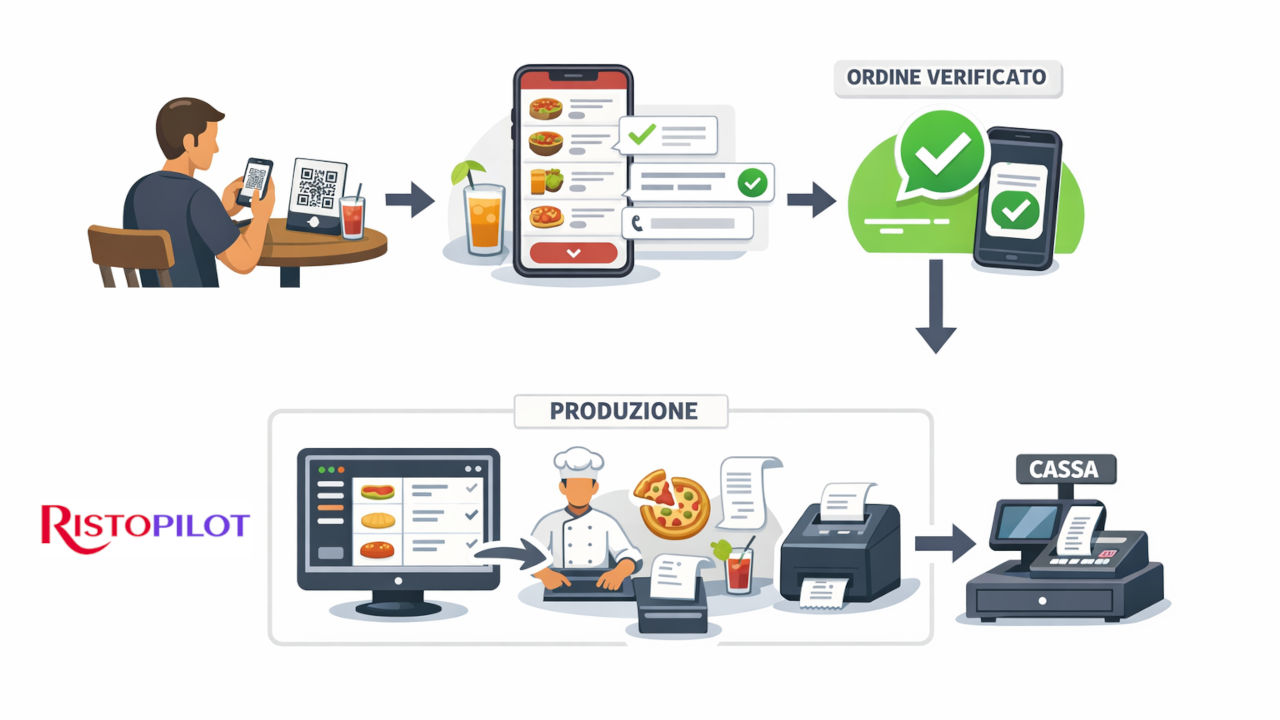
Customer Orders at the restaurant table: WhatsApp verification and traceability (to reduce non-authentic orders) ✅📩
A typical doubt is: “What if someone sends random orders?” For this reason, at the confirmation stage, the customer enters a phone number and receives a WhatsApp message. It is a simple step, but useful: it helps you connect the order to a real contact and give more reliability to the flow (also useful for Customer Management & Marketing).
In addition, when an order is traceable, it becomes easier to manage requests and changes without chaos: you know who the customer is, at which table they are sitting, and what the status of the request is.
Orders from Customers at the restaurant table: sent to production departments with KDS or WiFi printers (your choice) 🔥🖨️
When the order arrives, it must “land” in the right place: kitchen, pizzeria, bar. Here you have two modes, and you can also combine them: KDS (production screen) or WiFi printers for each department. The choice depends on how you prefer to work and how much you want to digitize.
Customer Orders at the restaurant table: what KDS is and why it really helps 📺👨🍳
The KDS (Kitchen Display System) is a system that shows order tickets to departments in a clear and updated way: each department sees only what it has to prepare (with notes, quantities, and order of courses), without lost slips or “spoken” handovers.
The practical advantage is immediate: fewer errors, fewer remakes, more control over timing. And when the department updates the status (in progress, ready, completed), communication with the dining room becomes cleaner.
Customer Orders in app: WiFi printers for departments and checkout (if you prefer paper) 📶🧾
If you want, each production department can have its own WiFi printer connected to Risto Pilot: when the order is sent, the order ticket can be printed automatically only in the correct department (kitchen, pizzeria, bar), with notes and quantities. It is convenient when the team is used to paper or you want an extra check.
The checkout can also have its own main printer: useful for receipts, invoices, and pre-bill printing. This way the orders entering the order ticket flow also arrive “prepared” for the moment you close the bill.
Related Modules 🔗
Orders from Customers work at their best when connected to production, checkout, and “outside the dining room” flows (also for Takeaway). And if you want to turn an order into a return visit, loyalty completes the circle. 🙂
Customer Orders at the restaurant table: when it makes sense to enable them (and how to make them work well) 🎯
Autonomous orders work best when you want to speed up repetitive service moments. To make them work well, only a few practical rules are needed: clearly visible QR Codes on active tables and dining rooms, a tidy digital menu, and clear management of departments (KDS with kitchen display or order ticket printing).
- Peak traffic times: reduce the waiting time between “sitting down” and “ordering.”
- Outdoor areas or terraces: more autonomy at the tables, fewer unnecessary trips.
- Event rooms: orderly flow and less confusion over requests.
- Small team: you free up time for welcoming guests and managing the service.
Orders from Customers at the restaurant table: try them live (limited tests) 🚀
Do you want to see in a demo the activation by dining room, the QR Code at the table, WhatsApp verification, and the sending to departments (KDS or printing)? Test the suite now: available test versions are limited.
Less waiting, more control, and a service that flows better. 🍽️😄