

- Features
- Orders and cash register
Restaurant orders and cash register
Discover how easy it is to have smoother service, fewer mistakes, and stress-free bill closing in just a few taps 🍽️💳
In a restaurant, the problem is not working hard. It is working in bursts: repeated orders, dishes that get lost, tables asking for the bill (especially if table and dining room management is not aligned with service) while the kitchen is still chasing details. And in the end, you do not lose time in the kitchen or in the dining room: you lose it in the flow of information.
With Risto Pilot, Orders and Cash Register become a single flow: what the dining room enters immediately reaches the right destination, courses follow a logical order, and at the cash register you always have a clear situation to close out quickly and cleanly. The result? Less confusion, fewer mistakes, better pace. ✅
- ✅ Clearer orders and quick changes during service
- ✅ Dining room and departments synchronized: fewer “duplicate orders” and fewer remakes
- ✅ Course management: you organize dishes by timing, not by stress
- ✅ Flexible payments: single bill, split evenly, or partial payments without going crazy
- ✅ Receipts and invoices organized and easy to find when needed
Want to explore the tax side in more detail? See Telematic Cash Register and Electronic Invoicing for restaurants (2026), where you will see, with practical examples and the complete cash desk workflow, how the Telematic Cash Register works directly within the Risto Pilot software.
Order and Cash Register Management: why the real gain is removing friction between dining room, kitchen, and payments 🔁
Every time the dining room has to “explain an order again,” every time the kitchen has to ask for confirmation, every time at the cash register you have to reconstruct what was consumed... you are paying an invisible cost: lost time and wasted energy.
An integrated Order and Cash Register Management system is meant to make the simplest thing in the world happen: the order is created once, handled by the right departments, and then turns into a bill without surprises. That way service becomes more predictable and you make decisions more calmly. 🙂
Restaurant orders: from order to plate, with more manageable timing and fewer mistakes ✅
Order taking is designed for the moment when the venue is in full swing: few taps, few distractions. Dishes and changes are entered easily, quantities and notes are managed, and you keep control over course releases to bring dishes out in a more orderly rhythm (instead of “everything at once and then we will see”).
The practical advantage is that the order does not remain “pending”: it immediately goes to the right department... with visibility on the KDS (statuses, priorities, and order of course releases visible in real time on the monitors in the production departments). Kitchen, pizzeria, bar: each one receives what it needs to prepare, at the right moment. This reduces the classic service problems: repetition, misunderstandings, remade dishes, unnecessary running around.
Course management: the difference between “service that flows” and “service that chases” 🍽️
Organizing course releases means giving the evening an order: starters, first courses, main courses, desserts. This is not theory: it is the simplest way to prevent a table from receiving mismatched courses or the kitchen from ending up handling urgency caused only by inaccurate communication.
Restaurant orders: synchronized departments (kitchen, pizzeria, bar) and less “word-of-mouth dependency” 🔥
When departments see orders in an organized and updated way, the whole service atmosphere changes: fewer requests for confirmation, fewer last-minute corrections, more focus on quality and timing.
The point is not to “digitize” because it is trendy. The point is to reduce human error in repeated handoffs, especially when the venue is full. And this turns into something the restaurateur feels immediately: less stress and more continuity.
Restaurant KDS: what it is and why it helps kitchen and dining room work better 👨🍳📺
The KDS (Kitchen Display System) is a system that shows production departments orders clearly and in real time through digital screens (for example: monitors, tablets, or handheld devices): instead of paper tickets that get lost or repeated orders, each department sees only what it has to prepare, with notes, quantities, and course order.
In practice, one simple thing happens: the dining room sends the course, the department takes charge of it, and can update the status (in progress, ready, completed). The result? Fewer mistakes, fewer remakes, more controllable timing, and cleaner communication between dining room and kitchen.
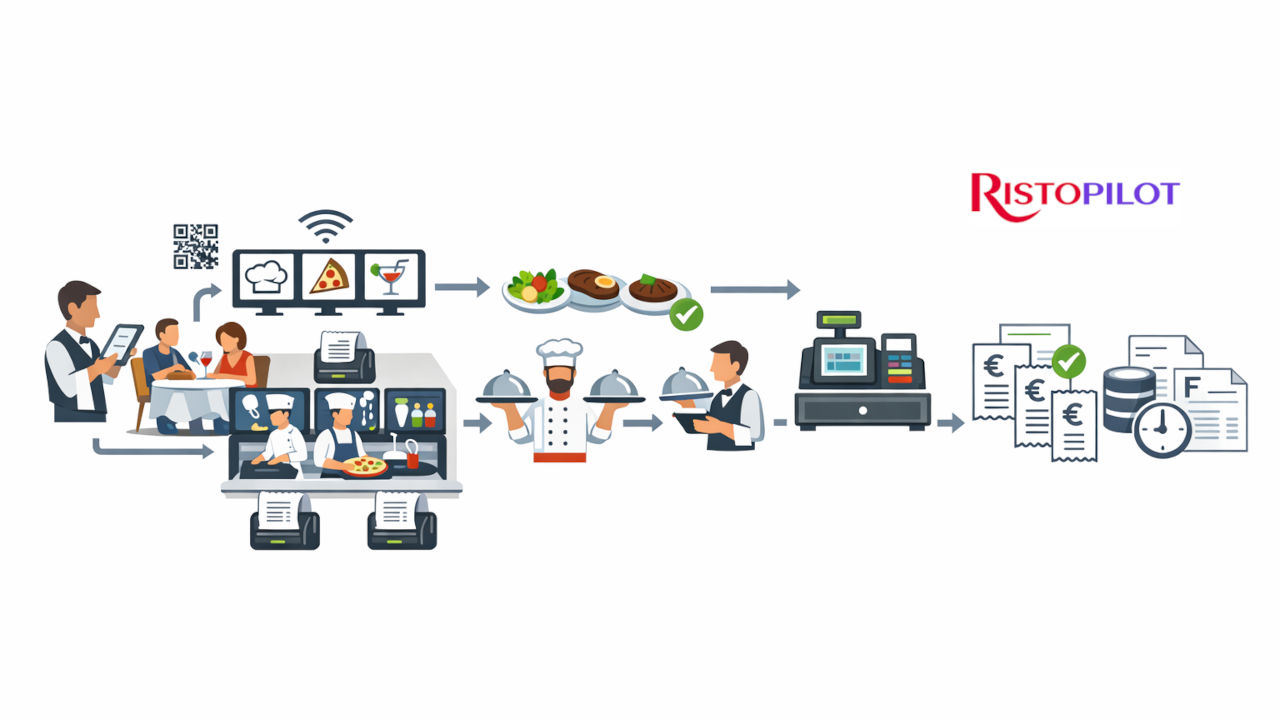
Orders and cash register workflow in the Risto Pilot restaurant management app
From the dining room with Orders or Customer Orders, through the kitchen with KDS or printers, all the way to issuing receipts and electronic invoices at the cash register.
Restaurant WiFi printers: printed orders and bills where needed, when needed 🖨️📶
Every restaurant has its own way of working: some want kitchen/bar/pizzeria to work on KDS (order monitors), some still prefer paper in the department, and some choose an intelligent mix. That is why Risto Pilot supports WiFi printers connected to the management system: depending on your configuration, you can decide what to print, where, and when.
Restaurant cash register printer: receipts, pre-bills, and takeaway orders (if enabled) 🧾
The Cash Register department has its main printer: this is the one you use to manage bills, print the receipt, the pre-bill printout, and, if you have enabled Takeaway, also print tickets for Pickup/Delivery orders. In practice: fewer manual steps and more speed during the busiest moments.
Production department printers: kitchen, bar, pizzeria (or KDS only) 🍕🍸
Production departments can have their own dedicated printer (for example kitchen, pizzeria, bar). When the waiter sends a course, the system can automatically print the order only for that department, with notes and quantities, so each one receives what it needs to do without “noise”.
Prefer a 100% digital service? No problem: you can choose to use KDS only in the departments, without printing anything. The goal is the same: reduce errors and keep service flowing.
Restaurant cash register: close the bill without reconstructing anything (and manage every kind of payment) 🧾💳
When it is time to pay, there is one goal: close quickly and without errors. With the restaurant cash register in Risto Pilot, you do not have to “remember” what was consumed: the bill comes directly from what was ordered and served.
And since reality is varied, the cash register is flexible: you can manage a single bill, a split bill, or partial payments (only some items). Then you choose whether to issue a receipt or an invoice, and you keep an organized document history.
Restaurant pre-bill: immediate table printout (with one button) 🧾🖨️
In the bill management screen, you also have the Print Pre-Bill button: you press it and the cash register printer immediately prints the table bill. It is a small function, but in the dining room it is worth gold: it reduces waiting times, speeds up table turnover, and makes payment cleaner.
Receipts and invoices: fewer requests afterward, more order right away 📩
Keeping documents well organized also means reducing the “post-service” workload: fewer customers calling back for a copy, fewer searches, less wasted time. And when needed, you know exactly where to put your hands.
Telematic Cash Register & Electronic Invoicing for Restaurants (2026) 🧾💳
If you want to understand how the complete workflow of electronic receipt, sales reporting, and invoices works with POS–RT connection, here you will find the dedicated guide to the Telematic Cash Register.
Restaurant orders: customer QR Code orders (optional) without creating a “parallel channel” 📲
If you want, you can also enable customer QR Code orders at the table. The advantage is that these orders do not end up “somewhere else”: they enter the same orders and cash register flow, without breaking the venue’s operations.
Order and Cash Register Management: concrete benefits you can feel from the very first week 🏆
- Smoother service: less running around “to clarify”, more pace.
- Fewer errors: clearer orders and synchronized departments (KDS or department printing).
- More control: you know what is happening without asking everyone (and you measure it in Statistics).
- Simpler payments: split bills without stress and without reconstruction.
- Organized documents: receipts and electronic invoicing, with documents always easy to find.
Related Modules 🔗
Orders and Cash Register work best when connected to production departments, table management, digital orders, and the tax side: this way every course reaches the right place and the bill closes without friction.
Restaurant orders and cash register: try them live (limited trials) 🚀
Do you want to see in a demo how to make service smoother, synchronize departments (KDS or printers), and close bills without stress? Try the suite now: available trial versions are limited.
Less confusion in the dining room, better pace in the kitchen, clear bills at the cash register. Good service. 😄