

- Features
- Staff Time Tracking
Restaurant Staff Time Tracking
Discover how you can digitally manage restaurant staff attendance, calculate hourly costs, and generate a timesheet ready to export ✅⏱️
Time is not only lost "between tables and dining rooms" during service: it is also lost before and after. Who started? Who is on break? How many hours were actually worked? And above all: how much did that shift cost? (statistics and reports are useful here too).
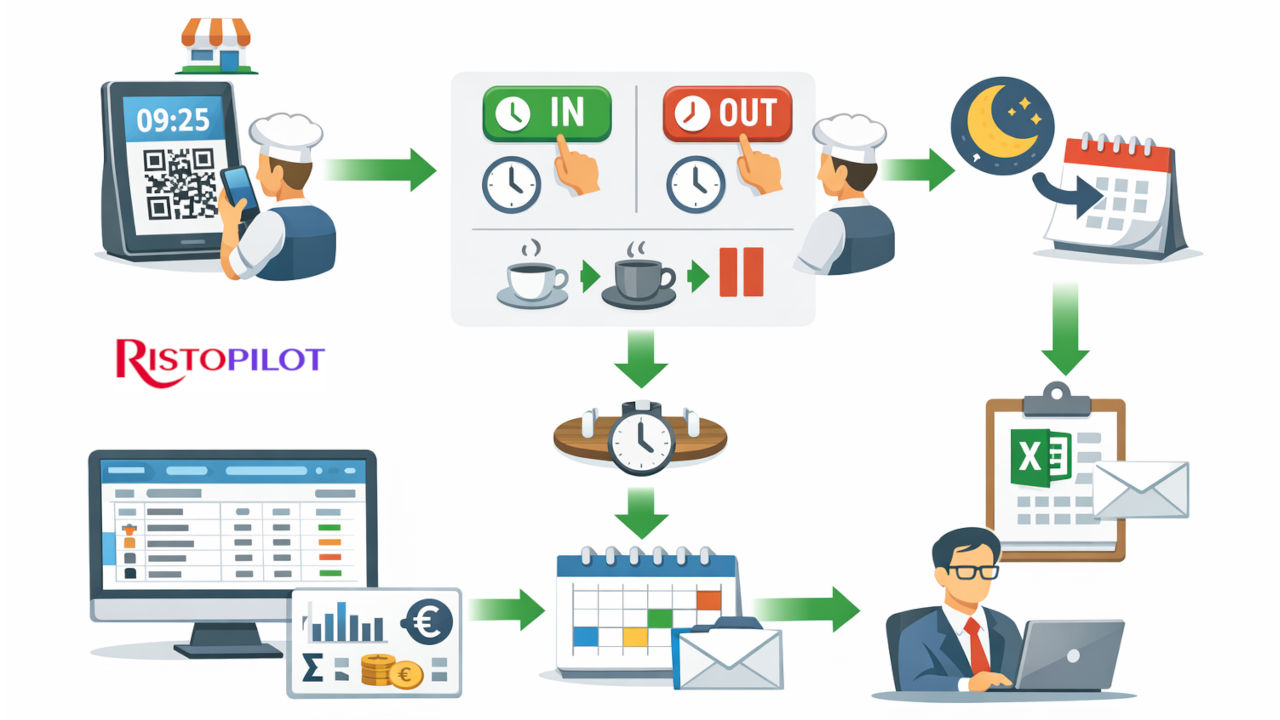
With Risto Pilot’s Time Tracking and Staff Management, you record attendance digitally (QR Code), find all worked hours in the timesheet, calculate amounts and generate clear reports, up to Excel export ready to send to your payroll consultant. The result? Less chaos, more control, and fewer “from memory” discussions. 🙂
- ✅ QR Code clock-in on a dedicated “Kiosk” device
- ✅ Shift start/end + break start/end (everything tracked)
- ✅ Monthly timesheet: daily hours and daily amount
- ✅ Monthly totals + weekly summary + Excel export
Staff time tracking and worked hours in your restaurant: why going digital is truly worth it 📌
Managing attendance “verbally,” on loose sheets, or in chat is fragile: one busy day is enough and everything falls apart. And when it does, time is wasted reconstructing things and working with estimates instead of real data.
- Operational clarity: you know who is on shift and who is on break.
- Cost control: hours and amounts become readable, day by day.
- Ready-made reports: the timesheet is no longer extra work at the end of the month.
- Traceability: less “I think so,” more objective data.
Staff time tracking in your restaurant: how the Kiosk with QR Code works 🔐📱
Every restaurant has a dedicated Kiosk account: you leave it logged in on a device at the venue. The screen shows date and time and a QR Code that regenerates every 10 seconds for security. The employee scans the QR code and starts the time entry from their personal profile.
Restaurant staff time tracking: clock in/out without unnecessary steps
From their own account, the employee sees the dedicated buttons and records shift start and shift end. Date/time and the updated worked time are always visible on screen.
Time tracking and hours worked by restaurant staff: manage breaks without confusion ☕
Breaks are not “deduced”: they are recorded. The employee can clock break start and break end with dedicated buttons, so the hours are more consistent and readable in the timesheet.
Restaurant staff time tracking: overnight shift management 🌙
If a shift ends after midnight compared to its start time, the worked hours are recorded on the previous day (the day when the shift started). It is a practical detail, but extremely important for consistent totals.
Staff Management and Time Tracking
Record staff working hours even in your absence, check worked hours, and export the timesheet for the payroll consultant.
Restaurant Staff Timesheet: the monthly timesheet that lets you read hours and costs at a glance 📊
The best part comes afterward: everything that has been clocked in ends up in the Timesheet. Here you can filter by employee (or view all), choose the month, and check: daily hours, daily amount, monthly totals, and weekly summary.
Staff time tracking and worked hours in your restaurant: employee selection and month navigation 🗓️
You select the worker (or “all”), change the month with the dedicated input, and navigate forward/backward. It is designed for quick checks: even when you have little time, you immediately find the data you need.
Time tracking and hours worked by restaurant staff: daily table + totals ✅
For each day of the month you can view Work Hours and Daily Amount. Below you find the Monthly Totals (total hours and total amount), so you do not need to reconstruct anything manually.
Restaurant Staff Timesheet: weekly summary (hours and amount) 📈
In addition to the daily detail, you have a weekly summary with the period and totals. It is useful for analyzing work trends and distribution without getting lost in individual days.
Restaurant staff time tracking: export Excel and send the timesheet to your consultant in a moment 📤
At the end of the month (or whenever needed) you can export the Timesheet to Excel. If you want to avoid forgetting, also set a reminder in the Calendar with reminders. This way the timesheet becomes an orderly, shareable output, without copy-pasting, screenshots, or manual calculations.
Staff time tracking and worked hours in your restaurant: clean reports, less wasted time 🧠
The point is not “having a file”: it is removing friction. With a clear export, you reduce back-and-forth, requests for clarification, and reconstructions: those who need to process the data work better, and you stay focused on service.
Related Modules 🔗
Time Tracking & Employees works best when connected to shift planning, operational reminders, and reports: this way you control attendance, costs, and organization without chasing papers and chats.
Staff time tracking in your restaurant: try it now (limited tests) 🚀
Want to see Time Tracking and Staff Management live with QR Code (Kiosk), breaks, monthly Timesheet, summaries, and Excel export? Test the suite now: available trial versions are limited.
Less “where are you?” and “how many hours did you do?”. More control, more peace of mind. 🍽️