

- Features
- Shopping List
Automatic restaurant shopping list
Discover how to place supplier orders, compare prices, and make smarter purchases with Risto Pilot 🛒📦
Restaurant purchasing is not “just buying”: it means avoiding stock shortages, limiting waste, remembering everything, and not wasting hours between calls, messages, and scattered price lists.
With Risto Pilot’s Restaurant Shopping List Management, you work marketplace-style: search for products, add them to the cart, change quantities in a moment, and then automatically generate orders split by supplier. Each supplier receives their order clearly and with full traceability, and you always keep the order history under control (also useful in statistics and reports). The result? More control, fewer forgotten items, fewer mistakes. ✅
- ✅ Innovative restaurant shopping list: products from multiple suppliers in one single interface
- ✅ Innovative restaurant supplier order management: one cart → automatically separated orders by supplier
- ✅ Automatic restaurant shopping list: fast, traceable order sending (with statuses and updates)
- ✅ Restaurant supplier orders: prices, VAT, unit of measure, and minimum order quantity always visible
Innovative restaurant shopping list: why it really changes the way you buy 🍽️➡️📦
When purchasing is managed “in pieces” (papers, WhatsApp, calls, voice notes, and different price lists), the same things always happen: something gets forgotten, too much of something else is bought, time is wasted, and it becomes hard to reconstruct what was ordered and when.
An automatic restaurant shopping list is not meant to perform magic: it is meant to make the process repeatable and controlled. You see the products, add them to the cart, confirm, and get clean, traceable orders. The benefit is concrete: less operational stress and more decisions based on data (not memory). 😄
Restaurant supplier order management: less waste and fewer stock shortages ✅
In the restaurant business, “missing an ingredient” is a huge hidden cost. And “buying too much” often means waste. A digital purchasing and control flow helps prevent overstock and stockouts because it makes clear what you are ordering (and you can identify patterns with the AI Assistant), in what quantity and from whom, with easier review and correction before sending. 📉
Innovative restaurant shopping list: which products you can order (depends on your suppliers) 🧾🚚
A natural question is: “Okay, but which products will I see in the shopping list?”. The answer is very practical: you will see the products from the suppliers you have configured and who can deliver in your area, on the delivery days you have defined with them. In practice, the list is not a generic catalog: it is your real shopping list, built around your agreements and your deliveries.
Restaurant supplier order management: configure delivery areas and days (for predictable timing) 📅✅
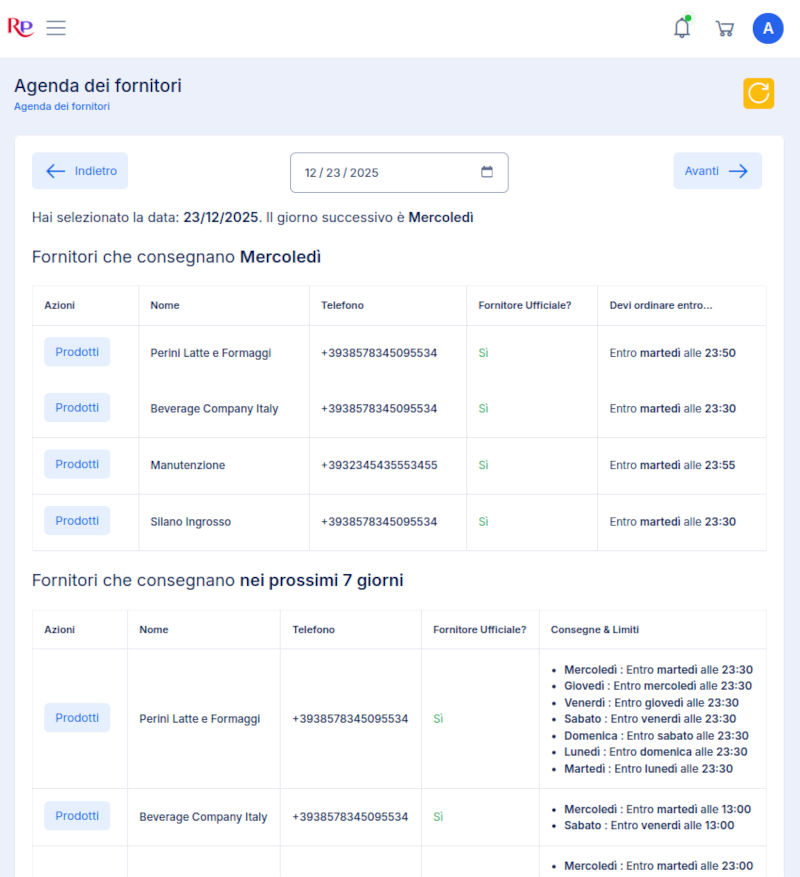
You can enter your suppliers’ settings into the system: served areas (region/province or zones) and delivery days. This way, when you shop, you already know “who delivers where and when”, and above all you can organize yourself to receive goods at predictable times.
In addition, you can also define a key rule for working well: by when the order must be sent to receive delivery within the agreed time. (You can also add a reminder in the Calendar for yourself or your employees.) That is the detail that prevents urgencies, calls, and “I need it right away” situations at the last minute.
WhatsApp message to the customer after the service requesting a survey
Automatic restaurant shopping list: import the supplier price list (CSV or Excel) and update it easily 📥📊
The products you can order come from your suppliers’ digital price lists. If the supplier provides you with a price list in CSV or Excel format, you can upload it into the system and immediately make articles, units of measure, minimum quantities, and prices available.
The advantage for the restaurant owner is huge: no more copying by hand and no more “scattered” price lists. When a price list changes, you update it quickly and your shopping list stays aligned with reality. Result? More accuracy in purchasing and fewer price or quantity errors. ✅
Restaurant shopping list management: why this setup benefits you too 🍽️
- You only order what can actually be delivered in your area, on the right days.
- You have predictable timing because you know by when the order must be sent to receive delivery.
- You see prices and conditions clearly, without opening a thousand files or chats.
- You reduce mistakes and forgotten items: shopping becomes a repeatable flow, not a rush.
In short: the innovative Shopping List for Restaurant and Supplier works well because it is based on your real suppliers, with their delivery rules and their updatable price lists. It is the simplest way to have a “marketplace-style” shopping experience, but with restaurant-owner logic and control.
Supplier Order Management with the RistoPilot Shopping List
Allow your staff to make purchases to quickly source missing products, automatically inform suppliers so you never run out of products for your restaurant
Restaurant shopping list management: how it works in practice (cart and order sending) 🛒⚙️
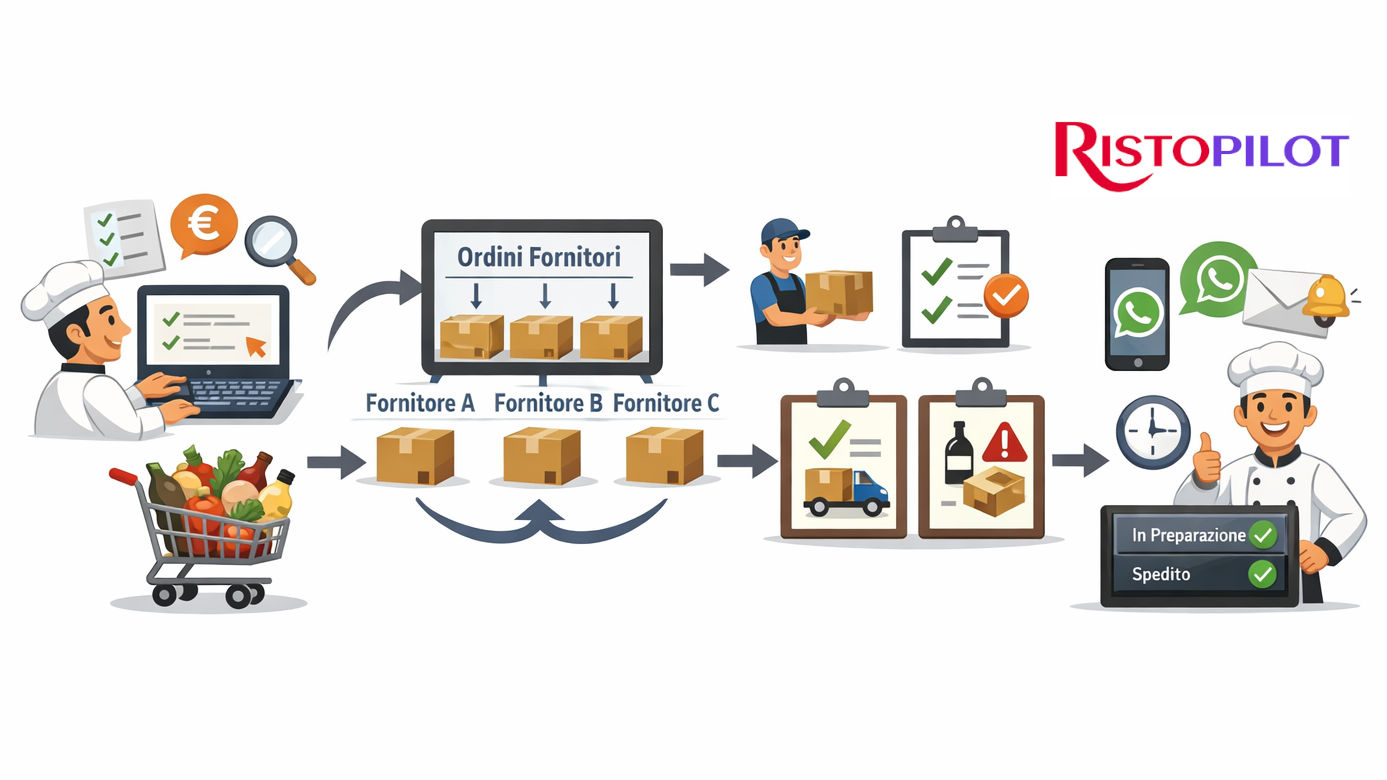
The Warehouse > Shopping section is designed to do one simple thing: build the shopping list and turn it into sendable orders, without wasting time copying products or manually “splitting” purchases for each supplier.
Automatic restaurant shopping list: search products by name or supplier 🔎
You view a paginated list of products from supplier price lists and can filter by product name or supplier. You only see products deliverable in your area, so you avoid wasting time with items not available in your zone.
Innovative shopping list for restaurant and supplier: all useful information clearly visible 🧾
For each product, you find the information that really matters when ordering: product name, supplier name, price, VAT, minimum order quantity, and unit of measure. This makes it easy to compare options and immediately understand whether an item “makes sense” for your shopping list.
Restaurant shopping list management: add to cart with one click 🛒
Next to each product, you have the cart icon: click it and the product is added to the shopping list. The cart is always accessible (icon at the top right), so you can quickly check what you have already added.
Restaurant supplier order management: edit quantities or remove products in seconds ✍️
Inside the cart, you can edit quantities or remove products without complications. This is the part that really saves time: before sending, you can tidy everything up calmly and send a clean order.
Automatic restaurant supplier orders: send the order and automatically split it by supplier 🚚✅
When you click Send Order, the shopping list is turned into separate orders for each supplier. You work with a single cart, but each wholesaler receives only their relevant order: more clarity for everyone, fewer mistakes, and less back-and-forth.
In addition, each supplier automatically receives: a WhatsApp message to the number dedicated to orders and an email to the address configured for received orders, with the direct link to the order page on Risto Pilot.
Innovative restaurant supplier order management: clear order page downloadable as PDF 📄
The supplier’s order page contains: date and time, product list, and a link to download or print the order as a PDF. This makes everything cleaner: fewer calls, fewer “can you resend it?”, and more operational efficiency.
Restaurant supplier order management: interactive order status (in preparation, shipped) 🔄📩
The supplier can interact with the restaurant through buttons that allow them to update the order status (e.g. In preparation, Shipped). Every status change automatically sends a communication to the restaurant owner, so you always know what stage the delivery is at without having to chase anyone.
Restaurant shopping list management: goods receiving and issue reporting (missing or damaged) 🧾🛡️
When the goods arrive, the important part is not only “receiving them”: it is checking them in correctly and recording any problems without wasting time and without “memory-based” discussions.
Innovative restaurant supplier order management: receiving with immediate issue reporting to the supplier ✅
At the time of receipt, the restaurant owner can mark products as missing or damaged (and more generally report anomalies). This automatically updates the receiving status and communicates to the supplier what did not go well.
Here too, the flow remains “traceable”: the supplier receives the update via WhatsApp and email and can see the details immediately, reducing delays and misunderstandings.
In practice: you truly control the goods entering your restaurant, the supplier has immediate visibility into any issues, and everything remains documented. It is a small but major difference, especially when service cannot wait.
Related Modules 🔗
The Smart Shopping List becomes truly “automatic” when connected to your restaurant’s numbers, sales flow, and operational reminders: this way you reorder better, waste less, and forget nothing.
Innovative restaurant supplier order management: try it now (limited tests) 🚀
Want to see live how the automatic restaurant shopping list works with price list imports (CSV/Excel), supplier-split orders, WhatsApp/email notifications, order statuses, and goods receiving with issue reporting? Try the suite now: available trial versions are limited.
Less time chasing suppliers. More control over purchasing. More peace of mind in the kitchen. 🍽️